

SLA vs MSLA vs LCD Resin 3D Printing: Which Technology Should You Choose?

SLA, MSLA, and LCD are not three unrelated resin-printing processes. They sit at different levels of the same technology family: vat photopolymerization is the broad process, “SLA” may name that family or a laser-scanning machine, MSLA describes a masked exposure approach, and an LCD resin printer commonly uses an LCD screen as that mask. To choose a machine, look past the label to the light engine, material support, build area, and the parts you need to make.

Start with the shared process: vat photopolymerization
Resin printing in this category cures a liquid photopolymer with light in successive layers. NIST describes vat photopolymerization (VP) as the broader category and notes that stereolithography has historically been used as a general name for it. In product comparisons, though, “SLA” is often used more narrowly for a printer that scans a laser across the layer. That difference in naming is why an SLA-vs-MSLA chart can seem to compare siblings when one term is being used broadly and the other specifically. NIST’s study of LCD-based vat photopolymerization
Laser-scanned SLA
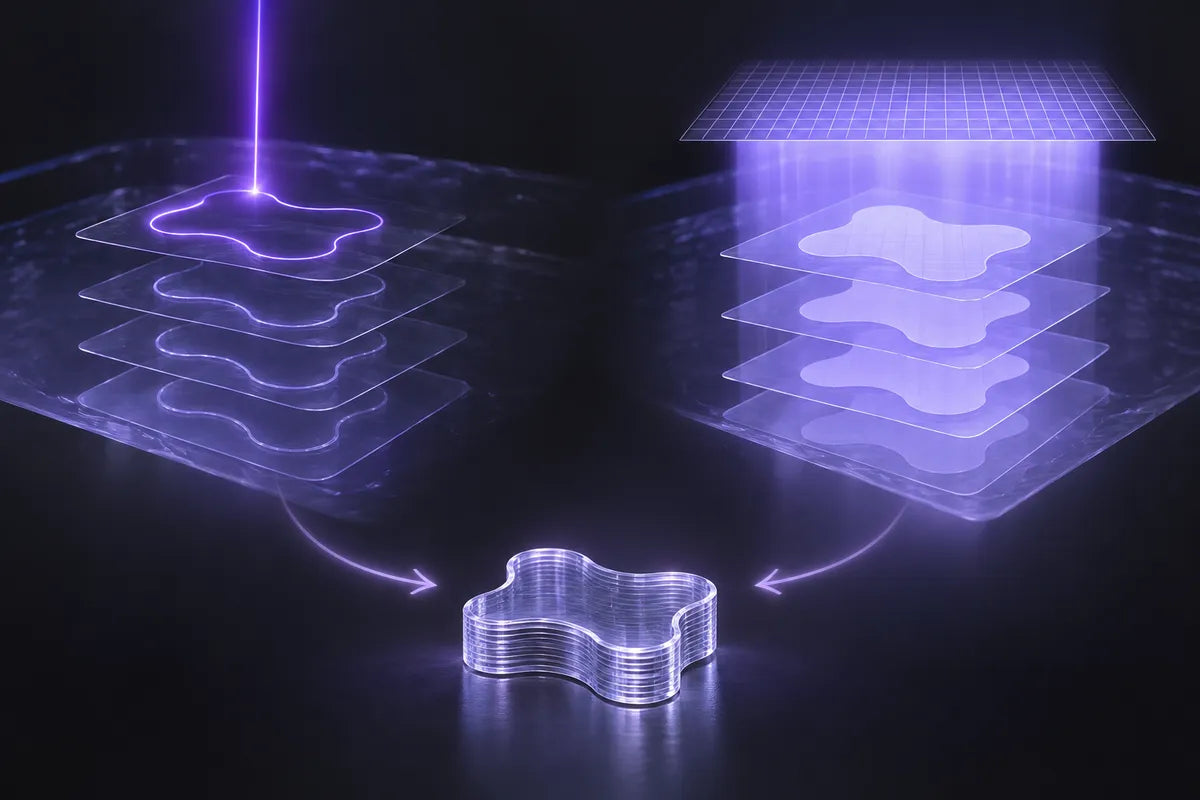
A laser-scanning system directs a focused beam along the paths that form a layer. The laser cures the resin where it travels, then the build platform and resin system move to prepare for the next layer. NIST explains that scan time depends partly on the cross-sectional area being cured: a larger layer or more parts on the same plate can require more laser travel. That is a description of the exposure mechanism, not a universal claim about total print time; layer height, motion, release, material, and machine design also matter.
Masked stereolithography (MSLA)
In masked stereolithography, a programmable image defines the layer pattern, so the system exposes the cross-section through a mask rather than drawing it point by point with a laser. MSLA means masked stereolithography. The mask can be made in more than one way: NIST identifies LCD screens and digital micromirror devices (DMDs) as common programmable-mask types. A DMD-based projector is often called DLP; Formlabs’ technical overview of DLP and MSLA describes the micromirror array used to form a projected image. An LCD panel is the familiar implementation in many desktop resin machines. These labels describe how the light pattern is made, not a guaranteed print-quality ranking.
Where LCD fits
An LCD resin printer is commonly an MSLA printer because its liquid-crystal display selectively blocks or passes light to create the layer mask. In that common use, “LCD” names the component and “MSLA” names the masked process. The terms are closely related, but they are not exact synonyms in every possible system: MSLA describes the masking approach, while LCD identifies one type of mask.
You may also see “SLA” used as an umbrella term for resin printing. When comparing a laser SLA machine with an LCD/MSLA model, check the product’s technical description for the actual light engine rather than relying on the acronym alone.
What the labels tell you—and what they do not
The technology label helps you understand how each layer is exposed. It does not tell you the finished part’s dimensional accuracy, minimum usable feature, surface quality, material behavior, or end-to-end throughput by itself.
For an LCD machine, the panel’s pixel pitch describes the spacing of pixels across the build area. It is one part of the XY image definition, not a promise that every feature at that size will print cleanly or measure accurately. Optical uniformity, light spread, resin response, exposure settings, supports, mechanics, and post-processing all influence the result. NIST’s measured study of one LCD-based light engine found spatial variation in irradiance and optical behavior that affected polymerization and surface texture. That result illustrates why a technology label or pixel number cannot stand in for a test of a particular printer and resin; it does not establish performance for every LCD machine.
The current Reflex RS Turbo product page identifies its technology as LCD (MSLA). HeyGears lists a 10.3-inch 8K Amber Screen, 405 nm wavelength, 29.7 μm native XY pixel, and ±15 μm accuracy as separate specifications. Treat those as manufacturer-listed specifications, not independent test results. When comparing models, ask how an accuracy figure was measured and under which material, settings, and conditions; do not convert the 8K label or pixel pitch into a guaranteed feature size.
Choose for the job, not the acronym
Use this sequence to evaluate an SLA 3D printer, an MSLA 3D printer, or an LCD resin printer:
- Write down the part requirement. Note the largest part, the smallest feature that must remain visible or fit, the surfaces that matter, and any dimensional tolerance you actually need to verify.
- Check material and post-processing support. Compare the exact resin’s technical data and instructions with the intended part. Resin formulations are not interchangeable just because two printers use light-curable resin. Include washing, drying, and curing requirements in the workflow.
- Compare the whole light engine and motion system. For laser systems, consider the spot and scan system. For masked systems, consider panel pixel size, light distribution, optics, and how the machine handles resin release. Specifications are useful screening information, not a substitute for a representative print.
- Match the build area and operating pattern. Make sure the part fits with its intended orientation and supports. If you expect to place several parts on a plate, compare complete job cycles under that workload; a layer-exposure method alone does not determine delivery time.
- Validate the result you care about. Print a representative model with the intended resin and finishing steps, then inspect the features and dimensions that define acceptance. Keep the material, profile, orientation, and post-processing conditions with the result so the comparison is interpretable.
For users considering the Reflex RS Turbo, the page lists Open Material Mode as adjustable settings for broader resin options. This is not a blanket statement that every third-party resin is validated: check the exact resin and printer instructions before use. The page also lists automatic resin heating, but notes that it requires the separately purchased RS Heated & Pulsing Release Resin Tank; the product selector includes configurations with the pulsing-release module. Verify the exact package before treating heating as an included feature.
Quick comparison
| Term | What it identifies | What to check next |
|---|---|---|
| Vat photopolymerization | Broad family: light cures liquid resin in layers | Material, optics, motion, and workflow |
| Laser-scanned SLA | A focused laser traces the layer geometry | Scan system, build size, resin, and measured part performance |
| MSLA | A programmable mask defines a layer pattern | Type and quality of mask/light engine, plus release mechanics |
| LCD resin printing | Common MSLA implementation using an LCD mask | Pixel pitch, optical behavior, resin support, and measured results |
FAQ
Is LCD different from MSLA?
LCD names a display technology used as a mask; MSLA names the masked stereolithography approach. Many LCD resin printers are therefore described as LCD/MSLA. Not every possible MSLA mask has to be an LCD.
Does 8K mean a printer is more accurate?
No. A pixel-count label and XY pixel pitch describe aspects of the image grid, not finished-part accuracy. Accuracy depends on the full printer, material, settings, geometry, and finishing process. Compare the measurement method and a representative result.
Which is faster, laser SLA or MSLA?
The exposure mechanisms differ: a laser scans paths, while a mask defines an area pattern. The actual job time also includes layer movement, release, resin flow, exposure settings, and the number and height of layers. Compare a complete job under the conditions you expect to use.
Share:
8K Resin 3D Printer Explained: Is Higher Resolution Really Better?