

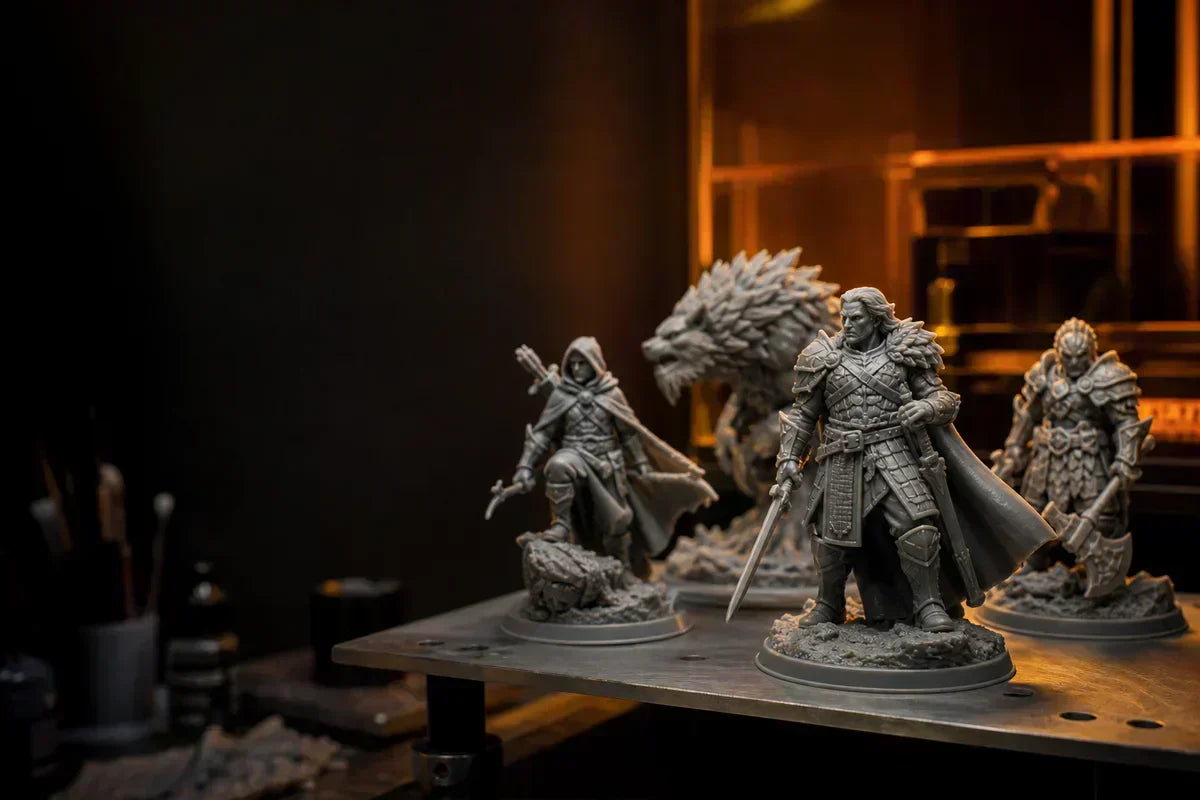
32-mm-Miniaturen belohnen Präzision. Erfahren Sie, wie Detailerfassung, Stützplatzierung, Ausrichtung, Harzauswahl und stabile Druckerbewegung zusammenwirken, um saubere, zuverlässige und bemalungsfertige Ergebnisse zu liefern.
Für Miniaturen-Bastler verändert der Maßstab alles. Eine 32-mm-Miniatur mag nur geringfügig größer erscheinen als ein 28-mm-Modell, aber beim 3D-Harzdruck eröffnet diese zusätzliche Größe die Möglichkeit für sichtbarere Gesichter, schärfere Rüstungskanten, tiefere Stofffalten, ausdrucksstärkere Posen und reichhaltigere Bemalungsmöglichkeiten.
Deshalb sind 32-mm-Miniaturen zu einem beliebten Maßstab für Tabletop-Rollenspieler, Miniaturenmaler, Sammler, Charakterdesigner, Wargaming-Fans und Kleinserienhersteller von Modellen geworden. Sie sind groß genug, um aussagekräftige Details zu zeigen, aber immer noch kompakt genug für Spieltische, Vitrinen, Kampagnenboxen und den Seriendruck.
Allerdings geht es beim guten Drucken von 32-mm-Miniaturen nicht nur darum, eine hochauflösende Datei auszuwählen und auf „Drucken“ zu drücken. In diesem Maßstab hängt die Qualität des Endmodells von drei zusammenwirkenden Faktoren ab: feiner Detailerfassung, intelligenter Stützstrategie und Drucker-Stabilität.
Dieser Leitfaden erklärt, warum diese drei Faktoren beim Einsatz eines Harz 3D-Druckers so wichtig sind, um saubere, zuverlässige und bemalungsfertige 32-mm-Miniaturen zu erstellen – und warum HeyGears RS Turbo eine gute Wahl für Schöpfer ist, die konsistente Ergebnisse wünschen.
Warum 32-mm-Miniaturen so beliebt sind
Der 32-mm-Maßstab liegt in einem praktischen Sweet Spot. Im Vergleich zu kleineren Tabletop-Miniaturen bieten 32-mm-Modelle Bildhauern mehr Raum, um ausdrucksstarke Gesichter, geschichtete Rüstungen, Waffen, Accessoires, texturierte Basen und dynamische Posen einzubeziehen. Im Vergleich zu größeren Ausstellungsmodellen sind sie einfacher in Batches zu drucken, leichter zu lagern und schneller zu bemalen.
Für Tabletop-Rollenspieler machen 32-mm-Miniaturen Charaktere während des Spiels leichter erkennbar. Das Schwert eines Kriegers, der Stab eines Magiers, der Umhang eines Waldläufers oder die Klauen eines Monsters sind von überall auf dem Tisch deutlich zu sehen. Für Maler bietet der Maßstab ausreichend Oberfläche für Schattierungen, Highlights, Trockenbürsten, Metallic-Effekte, Hauttöne und kleine Farbakzente.
Für Kreative und Verkäufer sind 32-mm-Miniaturen auch praktisch. Sie sind detailliert genug, um sich hochwertig anzufühlen, aber nicht so groß, dass der Harzverbrauch und die Druckzeit übermäßig werden. Das macht sie ideal für:
- Helden-Miniaturen
- NPCs und Begleiter
- Fantasy-Monster
- Science-Fiction-Soldaten
- Wargaming-Einheiten
- Boss-Kreaturen
- Display-fertige Tabletop-Modelle
- Individuelle Kampagnenfiguren
- Kleinserienproduktion von Harzmodellen
Die Herausforderung besteht darin, dass 32-mm-Miniaturen sowohl die Stärken als auch die Schwächen eines Harzdruck-Workflows aufdecken. Wenn der Drucker, die Stützen, das Harz oder die Nachbearbeitung nicht richtig eingestellt sind, sind die Fehler leicht zu erkennen.
Details sind im 32-mm-Maßstab wichtiger

Im 32-mm-Maßstab werden Details zu einem wichtigen Teil des Modellwerts. Ein sauberes Gesicht, eine scharfe Waffe, eine definierte Rüstungsplatte, ein strukturierter Umhang oder ein prägnantes Basiselement können eine Miniatur schon vor dem Bemalen professionell wirken lassen.
Der Harz-3D-Druck eignet sich besonders gut für diese Art von Arbeit, da er kleine Geometrien mit glatten Oberflächen und feinen Kanten reproduzieren kann. Aber nicht alle Details sind gleich. Einige Details sehen in einer digitalen Skulptur beeindruckend aus, lassen sich aber nicht klar drucken. Andere überleben den Druck, verschwinden aber nach dem Grundieren und Bemalen.
Für 32-mm-Miniaturen gehören zu den wichtigsten Details:
- Gesichtszüge
- Haarsträhnen und Bärte
- Rüstungskanten und Plattenlinien
- Waffenspitzen und Klingenkanten
- Lederriemen und Gürtel
- Kettenhemd, Schuppen, Fell und Stofftextur
- Finger, Krallen, Hörner und Zähne
- Basisdekorationen wie Felsen, Schädel, Gras oder Ruinen
Ein guter Druck sollte diese Merkmale klar genug erhalten, damit Maler damit arbeiten können. Wenn die Details zu weich sind, wird das Bemalen schwieriger. Waschtöne setzen sich nicht richtig in Vertiefungen ab. Trockenbürsten fängt Kanten nicht sauber ein. Gesichtszüge können nach dem Grundieren flach wirken. Rüstung und Stoff können an Definition verlieren.
Aus diesem Grund geht es beim 32-mm-Miniaturendruck nicht nur um die Auflösung auf dem Papier. Die eigentliche Frage ist, ob der Drucker konsistent feine, brauchbare, bemalbare Details auf kleinen, komplexen Modellen produzieren kann.
Stützen können die finale Miniatur zum Erfolg oder Misserfolg führen
Stützen sind einer der wichtigsten Aspekte beim Drucken von 32-mm-Miniaturen. Ein Modell mag hervorragende Details in der Skulptur aufweisen, aber schlechte Stützen können Narben auf sichtbaren Oberflächen hinterlassen, zu Fehlern führen, Waffen verbiegen, Finger beschädigen oder filigrane Texturen abflachen.
Im 32-mm-Maßstab ist das Modell klein genug, um eine präzise Stützplatzierung zu erfordern, aber groß genug, damit Stützspuren auch nach dem Bemalen noch sichtbar sind. Dies erfordert einen Spagat. Die Stützen müssen stark genug sein, um das Modell sicher zu halten, aber sanft genug, um die Oberfläche zu erhalten.
Eine starke Stützstrategie sollte schützen:
- Das Gesicht
- Brustpanzer
- Waffen
- Hände und Finger
- Mantelkanten
- Haar- und Bartdetails
- Dünne Hörner, Schwänze oder Flügel
- Texturierte Basen
- Frontflächen
Bei Charakterminiaturen sollte nach Möglichkeit vermieden werden, schwere Stützen auf Gesicht, Torso, Schildvorderseite, Umhangrückseite oder Waffenblatt zu platzieren. Bei Monster-Miniaturen sollte besonders auf Krallen, Zähne, Flügel, Stacheln und Schwänze geachtet werden. Diese Teile benötigen oft Unterstützung, aber Stützspuren sollten an Stellen platziert werden, wo sie leichter zu reinigen oder weniger sichtbar sind.
Die Größe der Stützen ist ebenfalls wichtig. Leichte Stützen sind nützlich für feine Details und kleine Überhänge. Mittlere Stützen eignen sich besser für stärkere tragende Bereiche wie Füße, Basis-Kontaktpunkte, größere Waffen und untere Körperpartien. Schwere Stützen sollten vorsichtig verwendet werden, da sie Spuren hinterlassen können, die ohne Beschädigung der geformten Details schwer zu entfernen sind.
Die besten 32-mm-Miniaturendrucke entstehen in der Regel durch eine durchdachte Platzierung der Stützen, nicht nur durch das Hinzufügen weiterer Stützen. Mehr Stützen bedeuten nicht immer einen besseren Druck. In vielen Fällen führen übermäßige Stützen zu mehr Reinigungsaufwand und verringern die Oberflächenqualität.
Ausrichtung beeinflusst Details, Stärke und Reinigung

Vor dem Anbringen der Stützen sollte die Modellausrichtung sorgfältig berücksichtigt werden. Die Ausrichtung beeinflusst die Sichtbarkeit der Schichten, die Platzierung der Stützen, die Saugkräfte, die Oberflächenqualität und die Wahrscheinlichkeit eines Druckfehlers.
Für 32-mm-Miniaturen bedeutet eine gute Ausrichtung oft, das Modell so zu neigen, dass wichtige, nach vorne gerichtete Details geschützt sind. Gesicht, Brust, Waffen und wichtige erzählende Details sollten keine stark gestützten Bereiche werden. Große flache Oberflächen sollten angewinkelt werden, um die Saugwirkung zu reduzieren und offensichtliche Schichtartefakte zu vermeiden.
Eine gute Ausrichtung kann helfen:
- Sichtbare Schichtlinien reduzieren
- Stützspuren in verborgene Bereiche verschieben
- Die Druckzuverlässigkeit verbessern
- Gesichts- und Rüstungsdetails schützen
- Die Oberflächenreinigung reduzieren
- Verhindern, dass dünne Teile sich verziehen oder brechen
Beispielsweise sollte eine 32-mm-Heldenminiatur mit Schwert und Umhang normalerweise so angewinkelt werden, dass die Stützen den Rücken, die Unterseite, die Basis oder weniger sichtbare Teile des Modells berühren. Ein Monster mit Flügeln erfordert möglicherweise eine andere Strategie, da große Flügel Sog und lange ungestützte Spannweiten erzeugen können. Ein kauerndes Modell, ein berittener Charakter oder eine dynamische Sprungpose können eine zusätzliche Stützplanung erfordern.
Es gibt keine einzige Ausrichtung, die für jede Miniatur funktioniert. Die richtige Wahl hängt von der Pose, der Basis, den Oberflächendetails, der Waffenform und den visuell wichtigsten Teilen ab.
Stabilität ist der verborgene Faktor hinter sauberen Drucken
Viele Anwender konzentrieren sich auf die Auflösung, aber Stabilität ist bei 32-mm-Miniaturen ebenso wichtig. Ein Miniaturdruck wird Schicht für Schicht aufgebaut, und selbst winzige Ungereimtheiten können die endgültigen Details beeinträchtigen.
Die Drucker-Stabilität beeinflusst:
- Schichtkonsistenz
- Kantenschärfe
- Oberflächenglätte
- Maßgenauigkeit
- Leistung der Stützstruktur
- Fehlerquote
- Wiederholbarkeit über Chargen hinweg
Für ein einzelnes Display-Modell mag ein guter Druck ausreichen. Aber viele 32-mm-Miniatur-Nutzer drucken nicht nur ein Modell. Sie drucken oft mehrere Helden, einen Satz Feinde, eine Gruppe Soldaten oder mehrere Versionen derselben Skulptur. In diesen Fällen wird die Wiederholbarkeit extrem wichtig.
Ein stabiler Harz-3D-Drucker sorgt dafür, dass das erste Modell und das zehnte Modell konsistent aussehen. Rüstungskanten bleiben scharf. Sockel bleiben flach. Waffen bleiben gerade. Feine Details werden in einigen Drucken nicht weich und in anderen klar.
Dies ist besonders wichtig für Kleinserienhersteller, Tabletop-Studios und Hobbyisten, die mehrere Miniaturen für eine Kampagne oder Sammlung vorbereiten. Fehldrucke verschwenden Harz, Zeit und Mühe. Instabile Drucke erzeugen auch zusätzlichen Schleif-, Ausbesserungs- und Neudruckaufwand.
Die Harz-Wahl sollte zum Anwendungsfall passen
Das für 32-mm-Miniaturen verwendete Harz sollte dem Verwendungszweck des Modells entsprechen. Ein Ausstellungsmodell kann maximale Details und eine perfekte Oberflächenbeschaffenheit erfordern. Eine Gaming-Miniatur benötigt möglicherweise eine bessere Haltbarkeit, da sie gehandhabt, transportiert, bemalt, fallen gelassen und gelagert wird.
Für 32-mm-Gaming-Miniaturen sollte Harz idealerweise Folgendes bieten:
- Scharfe Detailwiedergabe
- Gute Oberflächenqualität
- Ausreichende Robustheit für die Handhabung
- Geringe Sprödigkeit bei dünnen Teilen
- Zuverlässige Entfernung der Stützstruktur
- Gute Farbverträglichkeit
Dünne Teile wie Schwerter, Stäbe, Finger, Hörner und Krallen sind oft die ersten Bereiche, die brechen. Wenn das Harz zu spröde ist, mag das Modell großartig aussehen, aber während der Entfernung der Stützen oder beim Tabletop-Einsatz versagen. Wenn das Harz zu weich oder flexibel ist, bleiben Details möglicherweise nicht so scharf.
Für viele Benutzer ist ein ausgewogenes Harz die beste Wahl. Das Ziel ist nicht nur, eine schöne Miniatur zu drucken, sondern eine zu schaffen, die Bemalung, Lagerung und echtes Gameplay überstehen kann.
Die Bemalungsvorbereitung beginnt mit dem Druck

Für Miniaturmaler wirkt sich der Druckprozess direkt auf das Malerlebnis aus. Ein saubererer Druck bedeutet weniger Schleifen, weniger Stützspuren, schärfere Kanten und eine bessere Detailerkennbarkeit nach dem Grundieren.
Vor dem Bemalen von 32-mm-Miniaturen müssen Benutzer typischerweise Folgendes tun:
- Stützen vorsichtig entfernen
- Harzreste aus Vertiefungen waschen
- Modell vollständig trocknen
- Aushärten, ohne dünne Teile zu überhärten
- Stützspuren inspizieren
- Sichtbare Mängel reinigen
- Eine dünne Grundierungsschicht auftragen
Im 32-mm-Maßstab ist die Grundierungsdicke wichtig. Eine dicke Grundierungsschicht kann Gesichtszüge, Rüstungslinien, Stofftextur und winzige Basisdetails verdecken. Ein sauberer Druck ermöglicht es Malern, dünnere Grundierung zu verwenden und mehr von der Skulptur sichtbar zu lassen.
Dies ist ein Grund, warum Harzdruckdetails so wichtig sind. Je besser der Druck, desto einfacher ist das Bemalen. Gute Drucke geben Malern klare Kanten für Highlights, tiefe Vertiefungen für Washes und definierte Texturen zum Trockenbürsten.
Häufige Probleme beim Drucken von 32-mm-Miniaturen
Selbst erfahrene Anwender können beim Drucken von Miniaturen in diesem Maßstab auf Probleme stoßen. Zu den häufigsten Problemen gehören:
- Weiche Gesichtsdetails
- Gebrochene Waffen oder Finger
- Sichtbare Stützspuren
- Verzogene Basen
- Fehlgeschlagene dünne Teile
- Schichtlinien auf den Vorderflächen
- Überhärtete, spröde Details
- Harzreste in tiefen Texturen
- Dicke Grundierung verdeckt Details
Die meisten dieser Probleme entstehen durch eine Kombination von Faktoren. Eine schwache Stützstrategie, instabile Druckerbewegung, falsche Belichtung, schlechte Ausrichtung oder ungeeignetes Harz können die Druckqualität beeinträchtigen.
Die Lösung besteht nicht immer darin, die Belichtung zu erhöhen oder mehr Stützen hinzuzufügen. In vielen Fällen führen sauberere Ergebnisse zu einer besseren Ausrichtung, einer präziseren Platzierung der Stützen, einer stabilen Bewegung, optimierten Harzeinstellungen und einer sorgfältigen Nachbearbeitung.
Was 32-mm-Miniatur-Nutzer wirklich brauchen
Die Nutzer, die 32-mm-Miniaturen drucken, sind nicht alle gleich. Ein Tabletop-Rollenspieler möchte vielleicht einen individuellen Helden für eine Kampagne. Ein Maler möchte vielleicht eine hochdetaillierte Figur für die Ausstellung. Ein Spielleiter benötigt vielleicht zehn Feinde vor dem Wochenende. Ein kleiner Hersteller druckt vielleicht Chargen für Kunden.
Doch über diese Anwendungsfälle hinweg sind ihre Bedürfnisse ähnlich:
- Hohe Detailqualität
- Zuverlässiger Druckerfolg
- Saubere Entfernung der Stützstrukturen
- Konsistente Ergebnisse
- Gute Oberflächengüte
- Niedrige Fehlerquote
- Bemalungsbereite Modelle
- Haltbarkeit für die Handhabung
- Effizienter Batch-Druck
Deshalb muss ein guter Harz-3D-Drucker für 32-mm-Miniaturen mehr leisten als nur gut aussehende Testdrucke zu erzeugen. Er muss echte Miniatur-Arbeitslasten bewältigen: dünne Waffen, detaillierte Gesichter, geschichtete Rüstungen, texturierte Basen, kleine Stützkontaktpunkte und wiederholtes Seriendrucken.
Auswahl eines Harz-3D-Druckers für 32-mm-Miniaturen
Bei der Auswahl eines Druckers für 32-mm-Miniaturen sollten Benutzer über die reine Auflösung hinausblicken. Die Auflösung ist wichtig, aber das gesamte Drucksystem zählt mehr.
Wichtige Faktoren sind:
- Lichtsteuerung und Belichtungsgenauigkeit
- Z-Achsen-Stabilität
- Konsistente Schichtbewegung
- Zuverlässige Plattformhaftung
- Intelligenter Slicing-Workflow
- Materialkompatibilität
- Einfache Entfernung der Stützstrukturen
- Zuverlässigkeit beim Batch-Druck
- Wiederholbare Detailqualität
Ein Drucker, der einmal saubere Details produziert, ist nützlich. Ein Drucker, der konsistent saubere Details produziert, ist viel wertvoller.
Für 32-mm-Miniaturen-Ersteller ist Konsistenz der Faktor, der den Harzdruck von einem Trial-and-Error-Prozess in einen zuverlässigen Workflow verwandelt. Er ermöglicht es Benutzern, Charakterminiaturen, Monsterminiaturen, Trupps, Geländezubehör und Ausstellungsmodelle mit weniger Fehlern und geringerem Reinigungsaufwand zu drucken.
Warum HeyGears RS Turbo eine gute Wahl für 32-mm-Miniaturen ist
Für Benutzer, die 32-mm-Miniaturen drucken, muss der Drucker mehr leisten, als nur ein gut aussehendes Testmodell zu produzieren. Er muss echte Miniatur-Arbeitslasten bewältigen: dünne Waffen, detaillierte Gesichter, geschichtete Rüstungen, texturierte Basen, kleine Stützpunkte und wiederholtes Seriendrucken.
Hier wird der HeyGears RS Turbo zu einer starken Wahl für ernsthafte Hobbyisten, Maler, Tabletop-Schöpfer und Kleinserien-Miniaturhersteller.
Der RS Turbo wurde um drei Eigenschaften herum entwickelt, die direkt für den 32-mm-Miniaturendruck wichtig sind: Detailtreue, Stabilität und Workflow-Zuverlässigkeit. Sein optimiertes Amber-Screen-Display bietet ein hohes Kontrastverhältnis von 566:1, was die Lichtsteuerung für schärfere Details und sauberere Oberflächen verbessert. Für Miniaturen ist dies wichtig, da kleine Gesichtsmerkmale, Rüstungslinien, Stofftexturen, Kettenhemden, Monsterschuppen und Basisdetails leicht weich werden können, wenn die Belichtungssteuerung nicht präzise genug ist.
Stabilität ist ebenso wichtig. Im 32-mm-Maßstab können selbst kleine Schichtunregelmäßigkeiten das endgültige Aussehen einer Miniatur beeinträchtigen. Ein leicht weiches Gesicht, eine ungleichmäßige Rüstungskante, eine verzogene Basis oder eine instabile Stützfläche können vor dem Bemalen zusätzlichen Reinigungsaufwand verursachen. Das C5-Z-Achsen-Modul des RS Turbo unterstützt eine stabile Schichtdicke und ein konsistentes Schichtstapeln, wodurch Miniaturen von der Basis bis zur Spitze des Modells saubere Details behalten.
Für Benutzer, die mehrere Miniaturen gleichzeitig drucken, trägt der RS Turbo auch dazu bei, den Workflow zuverlässiger zu gestalten. Ein Tabletop-Rollenspieler benötigt möglicherweise mehrere Feinde für eine Wochenendsitzung. Ein Maler möchte vielleicht verschiedene Versionen desselben Charakters drucken. Ein kleiner Hersteller benötigt möglicherweise wiederholbare Ergebnisse über mehrere Chargen hinweg. In diesen Situationen ist die Druckkonsistenz genauso wichtig wie die Druckauflösung.
Der Dynamic Motion Algorithm 3.0 ist auch für Miniatur-Workflows nützlich, da 32-mm-Modelle oft stark von Schicht zu Schicht variieren. Eine Miniatur kann ein dünnes Schwert in einem Bereich, einen breiten Umhang in einem anderen und eine komplexe strukturierte Basis darunter umfassen. Durch die Anpassung der Bewegungssteuerung an unterschiedliche Schichtbedingungen hilft der RS Turbo, Geschwindigkeit und Druckqualität auszugleichen, anstatt jede Schicht gleich zu behandeln.
RS Turbo unterstützt auch ein optimiertes Druckerlebnis durch seine automatisch unterstützten Druckfunktionen, einschließlich Floating Screen Auto Leveling, Automatic Resin Refill und Automatic Resin Heating, wenn es mit dem kompatiblen beheizten und pulsierenden Harztank gepaart wird. Für Hersteller, die häufig Miniaturen drucken, kann dies sich wiederholende Einrichtungsarbeiten reduzieren und den Prozess zuverlässiger erscheinen lassen.
Für Nutzer von 32-mm-Miniaturen bedeutet dies einen reibungsloseren Weg vom digitalen Modell zur bemalfertigen Figur. Der Drucker unterstützt scharfe Details beim Harzdruck, sauberere Oberflächen, eine zuverlässigere Stützleistung und konsistente Ergebnisse bei Charakterminiaturen, Monsterminiaturen, Tabletop-RPG-Figuren, Ausstellungsmodellen und Kleinserienproduktionen.
Kurz gesagt, HeyGears RS Turbo ist ein leistungsstarker Harz-3D-Drucker für Kreative, die 32-mm-Miniaturen wünschen, die nicht nur detailliert, sondern auch zuverlässig, wiederholbar und einfacher zum Bemalen vorzubereiten sind.
Abschließende Gedanken
32-mm-Miniaturen sind klein genug, um praktisch zu sein, aber groß genug, um ernsthafte Details zu zeigen. Das macht sie zu einem der lohnendsten Maßstäbe für den Harz-3D-Druck.
Um sie gut zu drucken, benötigen Benutzer mehr als ein detailliertes digitales Modell. Sie benötigen einen Arbeitsablauf, der auf einer sauberen Detailwiedergabe, einer intelligenten Stützplatzierung, einer sorgfältigen Ausrichtung, einer stabilen Druckerleistung, geeignetem Harz und einer durchdachten Malvorbereitung aufbaut.
Wenn diese Elemente zusammenwirken, werden 32-mm-Miniaturen einfacher zu drucken, einfacher zu bemalen und befriedigender zu verwenden. Gesichter wirken schärfer. Rüstungen fühlen sich sauberer an. Waffen bleiben definierter. Monstertexturen werden dramatischer. Basen sehen professioneller aus. Und das fertige Modell fühlt sich bereit an für den Tisch, das Regal oder die nächste Kampagne.
Für Hobbyisten, Maler, Tabletop-Spieler und Kleinserienhersteller basieren die besten 32-mm-Miniaturdrucke auf einem einfachen Prinzip: Details sind wichtig, Stützen sind wichtig und Stabilität ist wichtig.
Mit einem Drucker wie dem HeyGears RS Turbo können Kreative einen zuverlässigeren Arbeitsablauf für den Miniaturdruck aufbauen und weniger Zeit mit fehlerhaften Drucken verbringen – und mehr Zeit mit Malen, Spielen, Sammeln und Gestalten.
Bereit, einen zuverlässigeren Miniatur-Workflow aufzubauen?
Entdecken Sie den HeyGears RS Turbo und erfahren Sie, wie kontrolliertes Licht, stabile Z-Achsen-Bewegung und Workflow-Automatisierung einen detaillierten, wiederholbaren Harzdruck unterstützen können.
Teilen:
So können D&D-Fans mit dem Harzdruck sauberere Details erhalten
Wie man Stützabdrücke auf Harzminiaturen vor dem Bemalen reduziert