

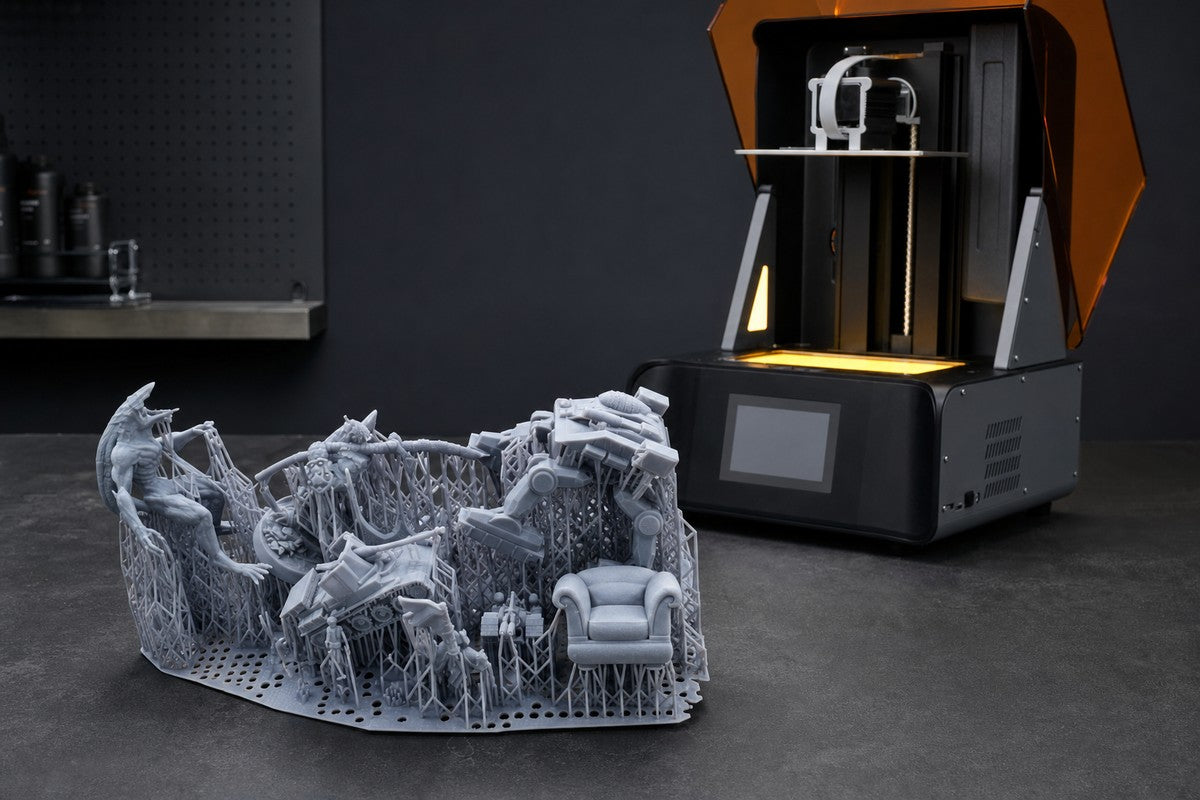
For miniature creators, tabletop gamers, and resin 3D printing enthusiasts, one highly detailed miniature is rarely the biggest challenge. The real test begins when you need to print ten, twenty, or even fifty models at once.
A full build plate can save hours—but it also multiplies the ways a job can go wrong. One weak support, unstable orientation, or unexpected peeling issue can compromise nearby models or even the entire plate.
Successful batch printing is therefore not simply a matter of fitting more models onto the platform. It requires a balanced system built around model arrangement, support optimization, resin performance, and printer consistency.
The real goal
Do not optimize for the highest model count per plate. Optimize for the highest number of usable miniatures produced per hour.
1. Why Batch Printing Miniatures Often Fails
When multiple miniatures share a print job, small problems become system-level problems. One unsupported island may begin to peel; a large cross-section can increase suction and release forces; poor orientation can create uneven pressure throughout the cycle.
More models create more potential failure points
A single miniature may succeed despite a minor preparation mistake. On a full plate, the same mistake is repeated—or sits close enough to other parts to affect them.
- A failed support can damage a nearby model.
- More cured surface area can increase peel force.
- Random orientation can create inconsistent loading.
- Incorrect exposure settings affect every model in the batch.
Common mistake: maximum density
Filling every available gap can restrict resin flow, increase local stress, and make washing and support removal unnecessarily difficult.
2. Build-Plate Layout: Space Models for Stability
A good batch layout leaves enough room for resin movement, avoids overlapping support structures, and balances parts with different heights and cross-sections.

Leave functional spacing
Models placed too close together can restrict resin flow, concentrate forces, and make post-processing harder. A small reduction in plate density can deliver a meaningful improvement in reliability.
Arrange mixed heights deliberately
A batch containing 32 mm characters, large monsters, terrain, weapons, and accessories needs more thought than a plate of identical units. Large or tall pieces generally deserve stable areas and more space. Smaller miniatures can then fill the surrounding zones without crowding their supports.
- Give large models additional clearance.
- Group similar-height models when practical.
- Keep support rafts and removal access in mind.
- Avoid concentrating every high-load part in one area.
3. Support Optimization: Protect Detail Without Losing Stability
Supports are one of the strongest predictors of miniature printing success. Too few can lead to missing details, warping, or complete failures. Too many increase preparation time, cleanup work, and the risk of visible surface marks.

Support heavy and vulnerable areas first
Prioritize weapons, extended arms, capes, large accessories, and long overhangs. These features often generate the greatest leverage or begin as small isolated regions.
Keep orientation consistent
Avoid a plate full of random angles. Similar orientations help produce more predictable peeling behavior, make support placement easier to review, and reduce variation across the batch.
Use automatic support tools as a starting point
Automatic supports can accelerate preparation, but professional results still require inspection. A reliable workflow is:
- Auto-generate the initial support structure.
- Inspect islands and critical first contact points.
- Add reinforcement beneath heavy or high-leverage features.
- Remove redundant supports from visible surfaces.
4. Choose Resin for the Entire Plate, Not One Model
Miniatures need fine detail reproduction, sharp edges, stable dimensions, and dependable layer adhesion. These requirements become more demanding when a full build plate is curing and releasing layer after layer.
A resin suited to batch miniature production should offer low shrinkage, enough toughness for thin weapons and accessories, and consistent curing performance. A material that seems adequate for one small model may behave differently when dozens of models increase the total cured area.
5. Printer Stability Determines Batch Success
As the number of models increases, consistency matters more than any single headline specification.
Uniform light exposure
Consistent curing energy across the build area helps preserve facial details, armor textures, and small accessories—whether a miniature sits near the center or closer to the edge.
Accurate motion control
A crowded plate places greater demands on the release cycle and Z-axis system. Stable mechanical movement helps reduce layer shifting, deformation, and intermittent failures.
Workflow efficiency
Production time includes model preparation, supporting, printing, washing, support removal, and post-curing. A printer that makes results more repeatable can save more total time than print speed alone.
6. How HeyGears RS Turbo Supports Reliable Batch Printing
For creators who routinely print multiple miniatures, reliability is the foundation of productivity. The HeyGears RS Turbo resin 3D printer is designed for users who want high detail, fast output, and dependable batch production in one streamlined system.
Fast printing without giving up miniature detail
RS Turbo combines high-speed performance with high-resolution resin printing, making it a strong fit for tabletop characters, monsters, collectible models, terrain, and small-studio production.
Consistent results across the build area
Stable exposure and mechanical performance help creators achieve more consistent outcomes across a populated build plate. The practical benefit is less time troubleshooting and more time painting, assembling, and creating.
A repeatable production workflow

7. Batch Printing Checklist
Before printing
- Check every orientation
- Review support contacts
- Leave model spacing
- Confirm resin settings
- Clean the build platform
During printing
- Watch the first layers
- Keep the workflow stable
- Check resin condition
- Maintain suitable temperature
After printing
- Remove supports carefully
- Wash models thoroughly
- Follow curing guidance
- Inspect details before paint
Bigger Batches Need Better Systems
Batch printing is one of resin 3D printing’s greatest advantages—but only when reliability grows with production volume. Printing more models does not have to mean accepting more failures.
By improving model arrangement, support strategy, resin selection, and printer stability, creators can produce larger miniature collections with fewer failed parts and less rework.
Build a More Reliable Miniature Workflow
Explore how HeyGears RS Turbo brings speed, precision, and consistency together for ambitious miniature batches.
Frequently Asked Questions
Why do resin prints fail more often on a full build plate?
A full plate introduces more support contact points, larger cumulative cross-sections, and higher release forces. Any weak support or poorly oriented model can also affect nearby parts.
Should I pack miniatures as closely as possible?
No. The best layout balances quantity with resin flow, support clearance, peeling forces, and post-processing access. Slightly lower density often produces more usable models per hour.
Can automatic supports handle a large miniature batch?
Automatic supports are a useful starting point, but every model should still be checked for islands, critical first contacts, heavy overhangs, and redundant supports on visible detail.
What matters most in a resin printer for batch miniatures?
Uniform exposure, accurate motion, dependable release behavior, and repeatable resin settings are essential. Real workflow efficiency is measured across preparation, printing, washing, curing, and cleanup.
Share:
How to Reduce Support Marks on Resin Miniatures Before Painting
First Resin Print Workflow: From Unboxing to a Successful Miniature