

Ein 3D-gedruckter Zeitschriftenorganizer hält schwere Zeitschriften, Akten und Papiere an einem Ort. Sie können Unordnung reduzieren und es einfacher machen, das zu finden, was Sie brauchen. Viele Menschen nutzen ihn zu Hause, in Büros und sogar in ihren Werkstätten.
Der 3D-Druck ermöglicht es Ihnen, nur das zu drucken, was notwendig ist; dadurch sparen Sie Materialverschwendung und reduzieren den Zeitaufwand.
Dieser Leitfaden erklärt:
- Wie man einen Zeitschriftenorganizer entwirft und druckt
- Tipps, um ein sauberes und brauchbares Ergebnis zu erzielen
Vorteile des 3D-Drucks Ihres Zeitschriftenhalters
Die Erstellung eines 3D-gedruckten Zeitschriftenhalters bedeutet, dass Sie ihn buchstäblich an Ihre Gegenstände anpassen können. Sie müssen Zeitschriften nicht mehr in einem engen kleinen Halter aufbewahren, der zu eng ist, oder einen verwenden, der zu groß ist, um in Ihr Regal zu passen. Sie können Größe, Form und Aussehen anpassen.
Anpassbare Abmessungen für verschiedene Formate
Ihr Organizer kann in der richtigen Höhe, Breite und Tiefe für alles hergestellt werden, was Sie haben: DIN A4-Zeitschriften, Broschüren oder Comics. Lassen Sie einfach etwas mehr Platz, damit die Dinge hineingleiten können.
Design- und Ästhetik-Vielseitigkeit
Sie möchten ihn schlicht und sauber auf Ihrem Schreibtisch? Oder etwas mit Aussparungen und einem Platz für Etiketten? Beides ist möglich. Sie können sogar die Farben an Ihr Zimmer anpassen, um es attraktiv aussehen zu lassen.
Skalierbarkeit durch modulares Design
- Drucken Sie kleinere Teile, die zusammenpassen.
- Fügen Sie später bei Bedarf weitere Abschnitte hinzu.
- Wenn ein Teil bricht, muss nur dieses eine Teil neu gedruckt werden.
Kosteneffizienz und nachhaltige Produktion
- Sie können Materialverschwendung vermeiden, da Sie nur das benötigte Material verwenden.
- Er kann stabil gemacht werden, ohne Filament oder Harz zu verbrauchen.
- Er ist relativ wirtschaftlicher als der Kauf eines Satzes fertiger Halter.
Grundlegende FDM-Vorbereitung für große Zeitschriftenorganizer
Für den 3D-Druck eines großen Zeitschriftenorganizers ist etwas Planung erforderlich. Sie müssen Größe, Festigkeit und Druckstabilität berücksichtigen. Einige kleinere Änderungen/Anpassungen vor dem Drucken verhindern unerwünschte Drucke und fehlerhafte Bereiche.
Auswahl von starrem PLA- oder PETG-Filamenten
PLA ist ein einfach zu 3D-druckendes Material. Es ist am besten für den Innenbereich geeignet. Es bietet eine gleichmäßige Form und glatte Seiten. PETG ist ein haltbareres, aber leicht flexibles Material. Wenn der Halter beispielsweise schwere Zeitschriften tragen soll, erweist sich PETG als widerstandsfähiger gegenüber Belastungen und reißt nicht.
Aufteilen von Modellen, um Ihr Bauvolumen anzupassen
Große Zeitschriftenorganizer können nicht auf einem Standarddrucker gedruckt werden. Sie können das Design jedoch in kleinere Abschnitte unterteilen. Diese Abschnitte können später mit Klebstoff oder einfachen Verbindern zusammengebaut werden. Dies vereinfacht auch den Druckprozess und minimiert die Fehlerwahrscheinlichkeit.
Optimierung von Infill und Perimetern für Stärke
Um den Halter stabil zu machen, benötigen Sie keine 100%ige Füllung. Die Füllung sollte moderat sein (ca. 15-25%) mit 2-3 Perimeter. Dies macht den Druck widerstandsfähig und robust und spart auch Zeit und Material.
Sicherstellung der Betthaftung für große Drucke
Große Drucke können sich vom Bett lösen, wenn die Haftung nicht stark genug ist. Verwenden Sie ein beheiztes Bett und stellen Sie sicher, dass es gut ausbalanciert ist. Um die Basis stabil zu machen, kann ein Brim oder Skirt hinzugefügt werden.
Die 6 praktischen Schritte zum 3D-Druck Ihres Zeitschriftenorganizers
Ein Zeitschriftenorganizer ist nicht schwer zu drucken; jedoch beeinflusst jeder Schritt das Ergebnis. Ein einfacher und vorsichtiger Prozess ist nützlich, um typische Probleme wie schlechte Passform oder schwache Teile zu vermeiden.
Schritt 1: Modellbewertung und Druckbarkeit prüfen
Beginnen Sie mit der genauen Bewertung Ihres Designs. Stellen Sie sicher, dass die Wände die Struktur nicht zu dünn machen und dass der Boden stark genug ist, um ein hohes Gewicht zu tragen. Überprüfen Sie außerdem Überhänge, die möglicherweise Unterstützung benötigen.
Schritt 2: Vorbereitung und Platzierungsprinzipien des Modells
Als Nächstes platzieren Sie das Modell in einer stabilen Position auf der Bauplatte. Kippen Sie das Modell nur, wenn es unbedingt notwendig ist. Eine korrekte Positionierung verbessert die Tragfähigkeit und reduziert den Einsatz von Stützen.
Schritt 3: Slicer-Setup für strukturelle Integrität
Durchschnittliche Füllung und ausreichende Wandstärke sollten verwendet werden, um die Last zu tragen. Ändern Sie die Schichthöhe je nach gewünschter Oberfläche. Eine geringere Geschwindigkeit kann die Qualität verbessern, insbesondere bei großen Drucken. Überprüfen Sie die Vorschau im Slicer, bevor Sie beginnen.
Schritt 4: Druckausführung und entscheidende Überwachung der ersten Schicht
Starten Sie den Druck und beobachten Sie die erste Schicht. Sie muss haften und glatte Konturen bilden. Die erste Schicht muss richtig sein; falls nicht, ist es ratsam, in den Anfangsstadien anzuhalten und zu korrigieren.
Schritt 5: Nachbearbeitung und sichere Entfernung von Stützen
Entfernen Sie Stützen nach dem Drucken langsam, um Beschädigungen zu vermeiden. Verwenden Sie bei Bedarf einfache Werkzeuge, aber erzwingen Sie keine Teile. Kanten, an denen die Stützen befestigt waren, müssen sauber bleiben, damit die Oberfläche gleichmäßig aussieht.
Schritt 6: Funktionelles Schleifen und Endmontage
Die rauen Bereiche und Passungen zwischen den Teilen können leicht geschliffen werden. Falls das Design in Teile unterteilt ist, kleben Sie diese mit Klebstoff oder Verbindern zusammen. Stellen Sie sicher, dass alles richtig sitzt, damit der Organizer flach steht und Gegenstände an ihrem Platz hält.
Alternativer Harz-3D-Druck-Leitfaden für kleine Zeitschriftenorganizer
Der Harz-3D-Druck ist ideal für die Herstellung kleiner Zeitschriftenorganizer mit hoher Präzision, glatten Oberflächen und langlebigen Funktionsteilen. Die Wahl des richtigen Harz-3D-Druckers, des Harzes und der Druckausrichtung gewährleistet zuverlässige Ergebnisse in professioneller Qualität.
Auswahl des besten Harz-3D-Druckers
Beim Drucken langlebiger Schreibtischaccessoires sind Stabilität und Materialkompatibilität entscheidend. Hier sind zwei zuverlässige Optionen, abhängig von Ihrem Produktionsumfang:
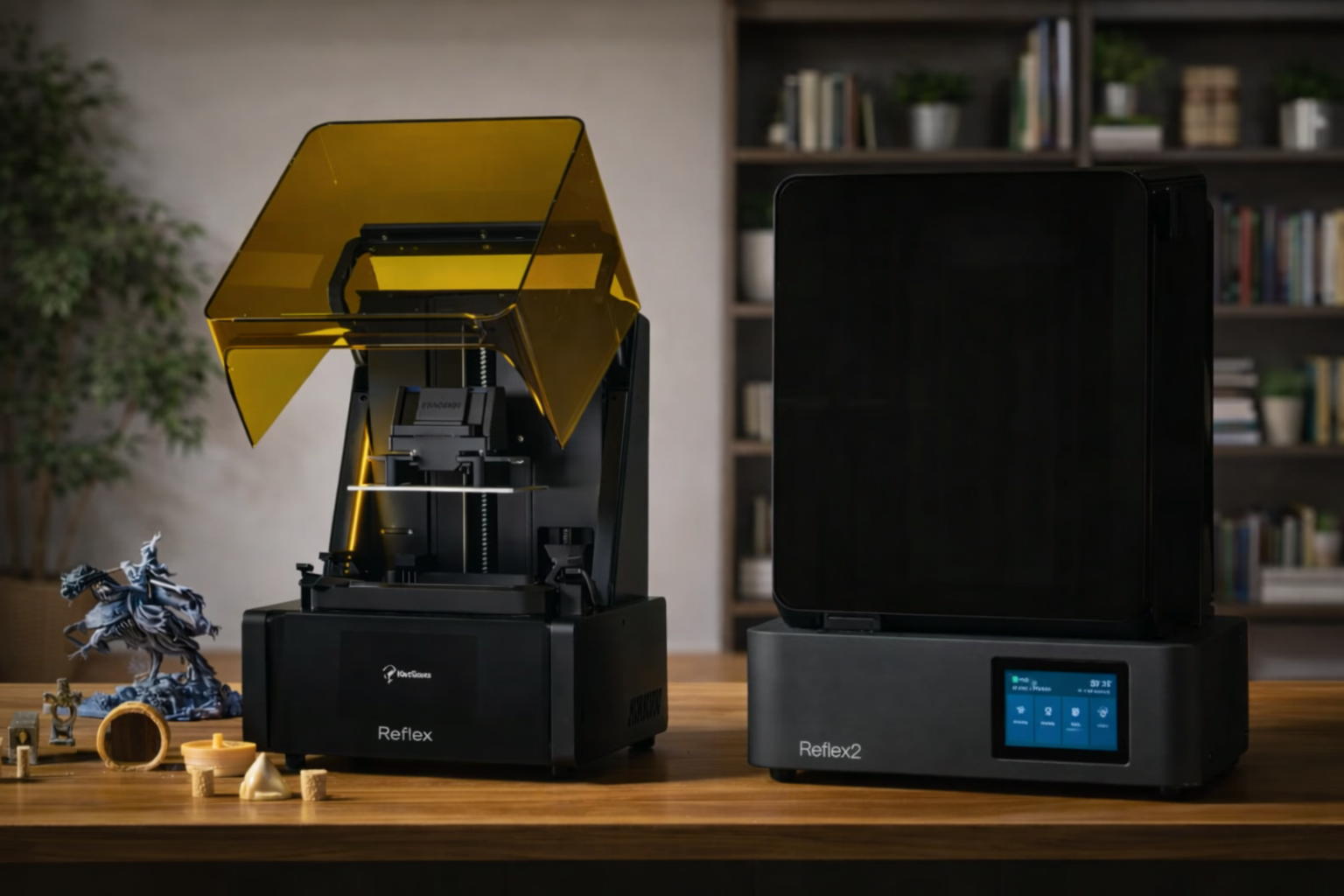
Reflex 3D-Drucker
Wählen Sie den Reflex 3D-Drucker, wenn Sie ein Hobbyist oder Profi sind, der hochwertige Desktop-Drucke mit minimalem Einrichtungsaufwand wünscht.
Technische Daten:
- XY-Auflösung: 33 μm für scharfe Details.
- Smart AI Peeling Force Management: Reduziert Schichtfehler.
- Automatische Harzstanderkennung & beheizte Wanne: Sorgt für optimale Harzbedingungen.
- Detailgenauigkeit: 90,6% der Oberflächen erfüllen ±0,05 mm Toleranz.
- Bauvolumen: 191×121×220 mm: ideal für kleine Organizer.
- Kompatibilität: Unterstützt ABS-ähnliche, flexible, hochdetaillierte Harze.
Reflex 2 3D-Drucker
Wählen Sie den Reflex 2 3D-Drucker, wenn Sie hohe Produktivität und präzise 3D-Drucke benötigen. Er ist ideal für kleine Unternehmen und Hobbyisten, die mehrere Organizer oder Funktionsteile mit gleichbleibender Qualität über alle Drucke hinweg herstellen.
Technische Daten:
- Bildschirm: 10,7 Zoll 6K Amber mit 161 OptiZone LEDs für gleichmäßiges Licht.
- Z-Achsen-Modul: C5-Klasse, ±2 μm Wiederholpositioniergenauigkeit.
- Druckgegossenes Unibody-Gehäuse: Hohe Stabilität und Vibrationsreduzierung.
- Optionaler Harzheizschaber: Hält die ideale Harztemperatur aufrecht und verhindert Sedimentation.
- Schwimmende Bauplattform-Auto-Nivellierung: Korrigiert bis zu 0,15° Neigung und 240 µm Lücken.
- Restmaterialerkennung: 0,15 mm Empfindlichkeit, automatischer Stopp bei Fehlern.
- Bauvolumen: 230×144×230 mm; geeignet für Kleinserienfertigung.
- Materialkompatibilität: Breites Spektrum an Hochleistungsharzen.

Auswahl von zähen oder ABS-ähnlichen Harzen
Ein funktionaler Zeitschriftenhalter erfordert Schlagfestigkeit, um den täglichen Gebrauch zu überstehen. Vermeiden Sie Standard-Sprödharze und entscheiden Sie sich für eine langlebige Alternative:
UltraPrint-Modellierung PAU10 ABS-ähnliches Harz
Wählen Sie PAU10 ABS-ähnliches Harz für funktionale Organizer, die Gewicht oder häufigen Gebrauch aushalten müssen. Es ist ideal für mechanische Teile, Gehäuse und Komponenten, bei denen Haltbarkeit und Schlagfestigkeit erforderlich sind.
Technische Daten:
- Schlagfestigkeit & Zähigkeit: Widersteht Rissen und Brüchen bei wiederholter Belastung.
- Maßhaltigkeit: +/-0,1 mm sorgt für präzise Passungen.
- Härte: 81 Shore D für Verschleißfestigkeit.
- Mechanische Leistung: Ähnlich wie spritzgegossenes ABS für Funktionsteile.
- Anwendungen: Schrauben, Gewindeteile, Gehäuse, funktionale Zeitschriftenorganizer.
- Haltbarkeit: Behält die Leistung bei wiederholter Handhabung und Nutzung bei.

Aufteilen von Modellen für kleinere Bauvolumen
Für größere Organizer, die das Bauvolumen des Druckers überschreiten, teilen Sie das Modell in kleinere Teile auf, die einzeln gedruckt und später zusammengebaut werden können. Dies verbessert den Druckerfolg und reduziert Materialabfall.
Aushöhlen von Modellen und Hinzufügen von Ablauflöchern
Das Aushöhlen von Teilen hilft, den Harzverbrauch und die Druckzeit zu minimieren. Das Hinzufügen von Ablauflöchern ermöglicht das Entweichen von ungehärtetem Harz, verhindert das Ansammeln und vereinfacht die Nachbearbeitung.
Abwinkeln von Teilen, um Schälkräfte zu minimieren
Das Neigen von Teilen reduziert die Saugwirkung zwischen den Druckschichten, wodurch die Wahrscheinlichkeit des Abhebens oder Versagens verringert wird. Eine korrekte Abwinkelung verbessert auch die Oberflächenqualität an den sichtbarsten Seiten des Organizers.
Kreative Tipps zur Anpassung Ihres Zeitschriftenhalters
Nachdem der Grunddruck vorbereitet ist, kann er durch einige kleine Anpassungen weiter verbessert werden, um ihn attraktiver und nützlicher zu machen. Hier sind einige Ergänzungen, die die Platzierung des Zeitschriftenorganizers für den täglichen Gebrauch erleichtern.
Anti-Rutsch-Pads zum Schutz Ihres Schreibtisches hinzufügen
Ein gedruckter Halter kann eine harte Oberfläche an der Unterseite haben und auf glatten Schreibtischen rutschen. Es ist möglich, kleine Gummi- oder Silikon-Pads darunter anzubringen. Dies stabilisiert den Halter nicht nur, sondern verhindert auch Kratzer auf dem Schreibtisch. Selbstklebende Pads sind einfach zu verwenden und zu befestigen.
Lackieren und Glätten für einen Premium-Look
Im 3D-Druck sind Schichtlinien typisch. Unebenheiten können durch leichtes Schleifen an exponierten Oberflächen entfernt werden. Sie können auch Sprühfarbe verwenden, um die Oberfläche sauber und glatt zu machen. Matte Farben eignen sich oft gut für den Bürogebrauch, während hellere Farben zu Heimeinrichtungen passen können.
Hinzufügen von Etiketten oder Farbanpassung
Sie können an der Vorderseite einen kleinen Platz oder ein flaches Stück für Etiketten hinzufügen. Dies hilft bei der Kategorisierung von Zeitschriften nach Typ oder Datum. Die andere Alternative ist, mehrere Halter in verschiedenen Farben zu drucken. Dies ermöglicht eine schnelle Sortierung von Artikeln, ohne alle überprüfen zu müssen.
FAQ
Passen Standard-A4-Zeitschriften oder Comics in einen 3D-gedruckten Organizer?
Das hängt von Ihrem Design ab. A4-Zeitschriften sind höher und dicker, daher müssen Sie zusätzliche Höhe und Tiefe einplanen. Comics sind kleiner und passen daher leicht hinein. Lassen Sie einfach etwas mehr Platz, damit Ihre Gegenstände leicht hinein- und herausgleiten.
Muss ich beim Drucken eines Zeitschriftenhalters Stützen verwenden?
Für die meisten einfachen Designs benötigen Sie keine Stützen. Verwenden Sie sie nur, wenn Ihr Modell steile Überhänge oder Kurven aufweist. Das flache Platzieren des Designs auf dem Druckbett hilft ebenfalls, die Verwendung von Stützen zu vermeiden.
Wie kann ich sichtbare Schichtlinien ohne Schleifen verbergen?
Verringern Sie die Schichthöhe im Slicer für ein glatteres Finish oder verlangsamen Sie Ihre Druckgeschwindigkeit. Ein weiterer einfacher Trick für FDM ist die Verwendung von mattem Filament, um Linien auf natürliche Weise zu verbergen. Wenn Sie Harz verwenden, gibt es andere einfache Möglichkeiten, um mit Schichtlinien bei Harz-3D-Drucken umzugehen.
Fazit
Einen eigenen Zeitschriftenhalter mit 3D-Druck zu erstellen, ist überraschend einfach. Größe und Form können an die Größe Ihres Desktops oder Regals angepasst werden. Große Komponenten oder abgewinkelte Teile können in kleine Stücke unterteilt werden, um den Druck einfacher und stabiler zu machen.
Manchmal kann ein kleines Detail, wie das Schleifen rauer Kanten, das Anbringen von Anti-Rutsch-Pads oder Etiketten, es funktionaler und attraktiver machen. Schließlich werden Sie einen praktischen, kostengünstigen Zeitschriftenhalter haben. Wenn Sie fertig sind, probieren Sie andere nützliche Harz-3D-Drucke für Ihr Zuhause, um Ihren Arbeitsplatz weiter zu verbessern.
Teilen:
3D-gedrucktes Computergehäuse: Eine vollständige Anleitung zum Selbstausdrucken
Müssen Sie ABS beim 3D-Druck belüften?